
Turn on live support mode
An administrator opens a 1 h, 4 h or 24 h help session: the Agora team sees the Hub's logs and state, and acts only if you tick the box.
Updated on Oct 14, 2026, 4:55 p.m.
On this page
In short. Support mode lets the Agora team help you live when a problem is hard to describe. You turn it on yourself, for 1 h, 4 h or 24 h. By default, the team only looks and changes nothing. It can act only if you tick a separate box. You can stop everything at any time.
Before you start #
- Be an Agora administrator (with staff 2FA if you require it).
- The Hub must have its license proof: the license must have been checked at least once. Support mode works on every tier, even in grace period or with a locked license.
- It does not exist in the demo.
- Nothing runs until you click: no connection to the Agora site, no timer.
Steps #
Open the screen. Go to Administration → Agora → Support mode (at the very bottom of the Agora page).
Pick the duration: 1 hour (recommended), 4 hours or 24 hours.
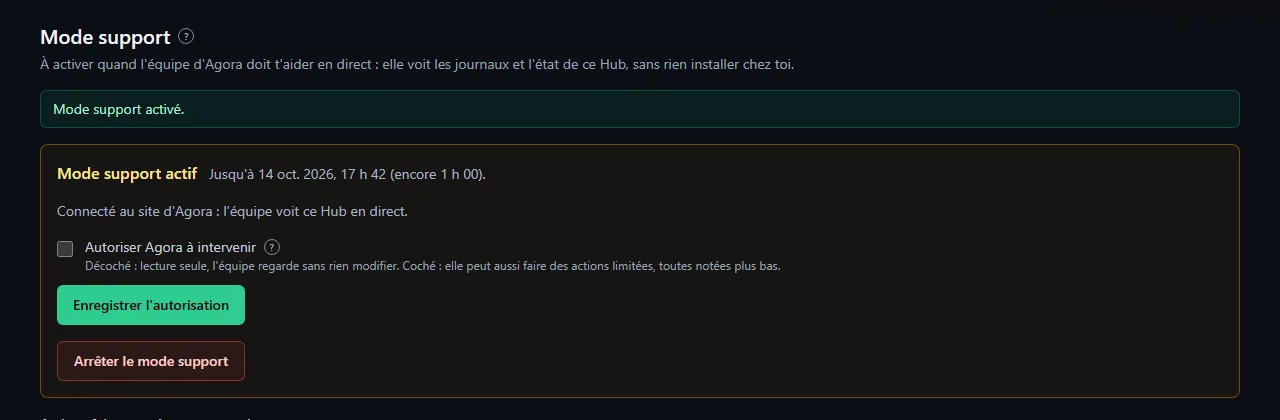
Decide on the "Allow Agora to intervene" box. It is unchecked by default. Unchecked means read-only. Checked, the team can also take limited actions (see What the Agora team sees and can do).
Click Turn on support mode. "Support mode on." appears, then the screen says it is connected to the Agora site and shows the end time.
Spot the red banner. While the mode is on, every administrator sees it at the top of each page, with the end time, "Read-only." or "They can also intervene.", and the Turn off support mode button.

Change your mind along the way, if you like. Tick or untick the box, then click Save permission: it takes effect immediately.
Stop when you are done. Click Turn off support mode (in the screen or in the banner): the connection is cut right away. Otherwise the Hub stops by itself at the end time.
You know it worked when… #
- The screen shows the active mode, the end time and the connection to the Agora site.
- The red banner is visible on every administration page.
- After stopping, you see that support mode is stopped and there is no connection with the site any more.
See what was done #
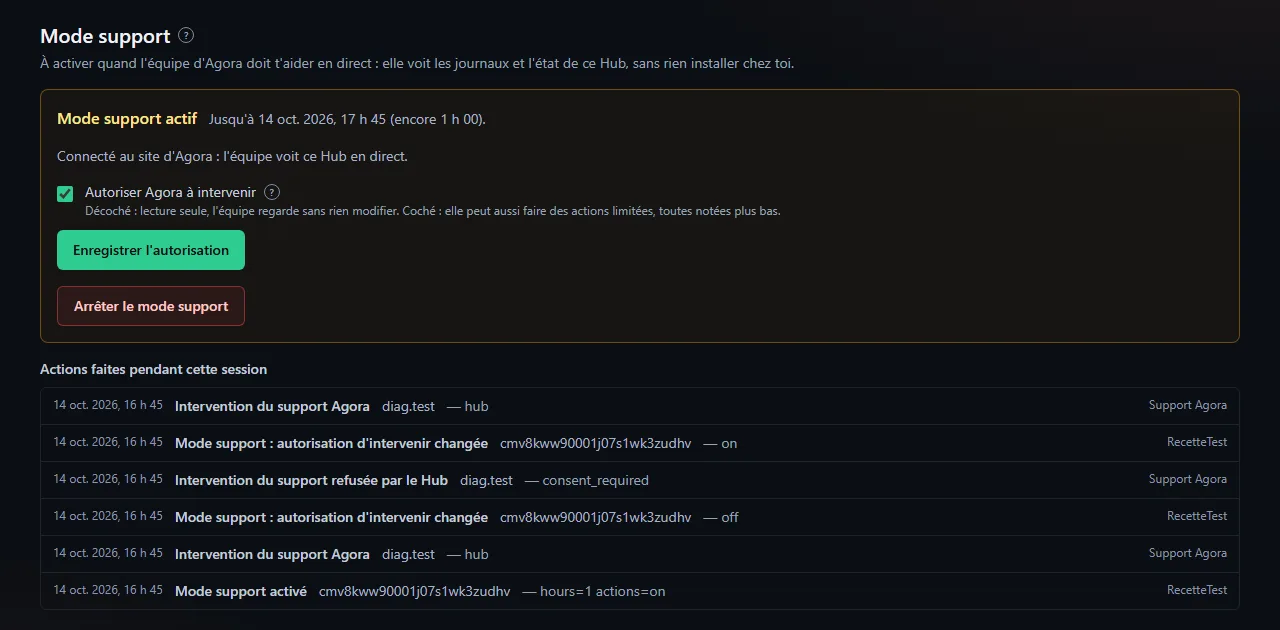
Under the block, the Actions during this session list shows every opening, every permission change, every intervention by the team and every refusal. The same lines are in Administration → Logs (Audit).
If it does not work #
| What you see | Likely cause | What to do |
|---|---|---|
| "The Hub has no license proof yet" | The license has not been checked yet | Try again once the license is active in Administration → Agora; see License server unreachable |
| "The Agora site did not answer. Nothing was turned on." | The Agora site cannot be reached right now | Try again in a moment: no session was opened |
| "The Agora site refused the session. Nothing was turned on." | The site refused the opening | Try again later; if it lasts, open a ticket |
| "A support session is already open." | Another administrator already turned it on | Look at the banner; stop it if needed |
| "Too many tries: try again in a minute." | Too many clicks in a short time | Wait a minute |
| "Support mode does not exist in the demo." | Public demo | Nothing |
| The block keeps saying it is connecting to the Agora site | The site is not answering yet | Wait a little; if needed stop, then turn it on again |
Going further #
- Outgoing connection only. The Hub calls the Agora site: no port to open on your side, and nothing goes through the FiveM resource.
- Hub restart. If the Hub restarts during a session that is still valid, it resumes with the same end time and the same permission. If the Agora site does not answer at that moment, the session is closed.
- Not the same as error reports. Error reports send past failures, one by one; support mode gives a live view, for a limited time.
Was this article helpful?
Related articles
- What the Agora team sees and can do in support modeRead-only by default; limited interventions only if you tick the box; secrets never leave; everything is written to the log.
- Errors and error reports (Administration → Errors)Agora stores every failure of the site, browsers and the FiveM resource, cleaned of any sensitive data, and can send it to the Agora team.
- Report an error to Agora ("Report to Agora" button)From the error log, one click shows what will be sent (scrubbed), gives a support ID and opens a private, pre-filled ticket on Agora's Discord.
- Require two-factor authentication for staffOne box in Administration → Configuration → Security: a staff member without 2FA on Discord can no longer enter the admin area or the MDT; the forum stays open.
- The administration logWho did what, when and from which address: sensitive settings, members, moderation, databases, backups, license; filterable and exportable.
- Glossary: Agora's technical words, explained simplyHub, panel, egg, Docker, MariaDB, framework, lease: every technical word in the documentation defined in a sentence or two, by topic.