
What the Agora team sees and can do in support mode
Read-only by default; limited interventions only if you tick the box; secrets never leave; everything is written to the log.
Updated on Oct 14, 2026, 4:55 p.m.
On this page
In short. When you turn on support mode, the Agora team looks at your Hub read-only. It can act only if you ticked "Allow Agora to intervene", and only from a closed list. Secrets are masked before anything is sent, and every action is written down on your side.
Before you start #
- Support mode must be on (red banner at the top of the page).
- Only an administrator can turn it on, stop it or change the permission.
What the team sees (box unchecked: read-only) #
- The Hub's logs: its latest lines (2,000 at most, kept in memory only), then new ones live.
- A diagnostic: version, database, game database, license, Discord, panel, txAdmin, live map, updates, recent errors.
- Your non-secret settings. For a secret setting, it sees only "set" or "empty", never the value.
The team can change nothing in this mode: the Hub refuses every action command while the box is unchecked, whatever the site asks.
What the team can do (box checked) #
A closed list, and the Hub checks every request:
- change a few options of the administration screen (a precise list: never the license, a secret, or the access to the panel, the game database or Discord);
- send one line to the server console (same tier as the Console screen: without that tier, the request is refused);
- rerun a connection test (game database, Discord, panel, txAdmin, license server);
- resync Discord;
- clear a cache (panel or Discord);
- check for updates;
- restart the Hub, only if it runs under a supervisor that starts it again (otherwise the Hub refuses, so it does not stay stopped).
Never a system command, never free-form SQL, never a secret or a license key. The number of requests is also limited.
What never leaves #
Before sending, the Hub masks passwords, tokens, keys, encrypted secrets, the license lease, addresses with credentials, IP addresses and e-mails. Lines are masked as soon as they enter the Hub's memory.
Find what was done #
- In Administration → Agora → Support mode, the Actions during this session list shows everything, with the time and the author.
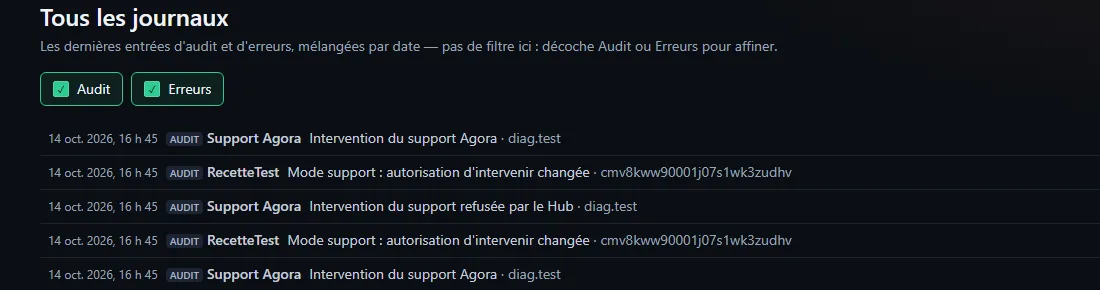
- In Administration → Logs (tick Audit), every intervention carries the actor "Support Agora". You read the command and its non-secret parameters, never a console's content. A refusal by the Hub is written too ("Support intervention refused by the Hub").
You know it worked when… #
- A request made while the box is unchecked shows as refused, and nothing changed on your side.
- After ticking the box and saving, interventions show up under "Support Agora".
If it does not work #
| What you see | Likely cause | What to do |
|---|---|---|
| "The Agora site did not answer" when turning on | The Agora site cannot be reached | Nothing was opened; try again later |
| "The Hub has no license proof yet" | The Hub has not reached the license server yet | Wait until the license is active; see License server unreachable |
| The session does not resume after a Hub restart | The session had expired, or the site did not answer | It is closed: turn support mode on again |
| The session resumes after a restart | It was still valid | Normal: same end time, same permission; stop it if you no longer want it |
| An intervention is refused | Box unchecked, or a request outside the list | See the log; tick the box if you agree |
Going further #
- Hub restart. A session that is still valid resumes with the same end time and the same permission; if the site does not answer, it is closed.
- Automatic end. At the end time, the Hub closes everything by itself, without waiting for the site.
- For past failures, see Errors and error reports.
Was this article helpful?
Related articles
- Turn on live support modeAn administrator opens a 1 h, 4 h or 24 h help session: the Agora team sees the Hub's logs and state, and acts only if you tick the box.
- Errors and error reports (Administration → Errors)Agora stores every failure of the site, browsers and the FiveM resource, cleaned of any sensitive data, and can send it to the Agora team.
- Report an error to Agora ("Report to Agora" button)From the error log, one click shows what will be sent (scrubbed), gives a support ID and opens a private, pre-filled ticket on Agora's Discord.
- The administration logWho did what, when and from which address: sensitive settings, members, moderation, databases, backups, license; filterable and exportable.
- License or update server unreachableNothing shuts off right away: check the machine's outbound HTTPS access to lic1 and lic2.agorapanel.com, DNS and the firewall.
- Glossary: Agora's technical words, explained simplyHub, panel, egg, Docker, MariaDB, framework, lease: every technical word in the documentation defined in a sentence or two, by topic.