
The live map: permissions, on duty, multi-job, OneSync
Live player positions for staff, and for on-duty colleagues of the same job if you open it; almost no cost for the game server.
Updated on Oct 5, 2026, 9:25 a.m.
On this page
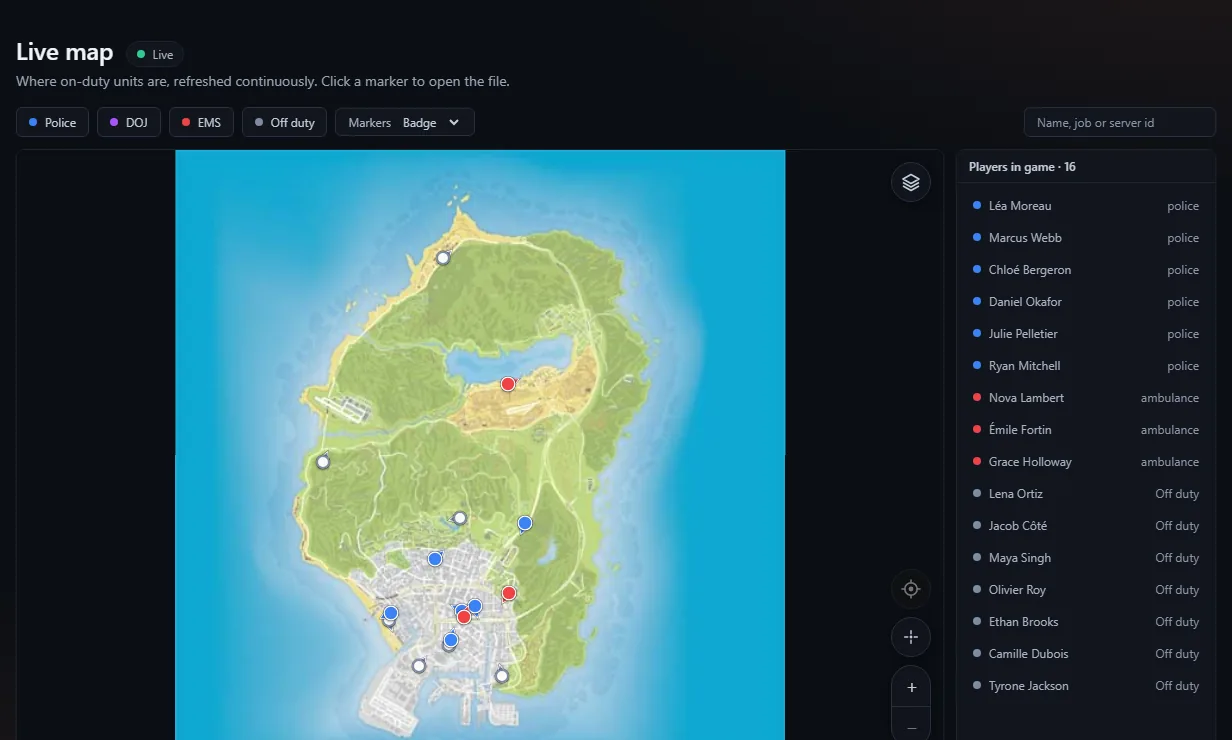
In short. There are two views on the Map page of the top bar (it only shows for people who have a right). The staff map (Whole server) shows the whole server. The colleagues map (My colleagues, also the Colleagues map tile of the MDT) shows an on-duty player only the on-duty colleagues of their job. Everything is closed by default, except for administrators.
Permissions #
| Who | Rule | Default |
|---|---|---|
| Administrators | Staff map, always (cannot be removed) | yes |
| A staff role (moderators, etc.) | The Staff live map right, ticked in Administration → Roles | no |
| A job or a rank | The See on-duty colleagues on the map permission, ticked in MDT → Settings | no |
| Multi-job | Map: multi-job option, under Manage on the service card: see all their jobs at once | no |
A member who has both rights picks their view with the Whole server / My colleagues switch.
The staff map rechecks rights every minute: a member who is suspended, or loses their role, sees their already-open map cut off within 60 seconds at most.
The colleagues map #
For a player whose job or rank has the permission:
- they must be on duty themselves, with an account linked to the game;
- they see only on-duty players of that job: never another job, an off-duty player or a player without a character;
- filtering is done by the server: their browser never receives the other positions;
- if they go off duty, the map empties and closes: "You are no longer on duty";
- multi-job off: on duty in several jobs of the service, they pick one; multi-job on: they see all those where they are on duty.
It works on the site as well as in the in-game tablet.
Map settings #
Administration → Configuration → Live map:
- Enable the map: unticked, the resource stops sending positions.
- Packet interval (in the collapsed Advanced part): 1 to 30 seconds, 2 by default. The browser interpolates: a faster cadence does not make the map smoother.
- Staff see every player on their map: unticked (default), the staff map shows only on-duty players; ticked, it shows the whole server (civilians included, and players without a character in grey). The colleagues map only ever shows on-duty colleagues.
The map background #
Agora ships no Rockstar image. Without a background, the map works on a neutral backdrop, markers in the right place. Map background block:
- Install Atlas or Satellite: downloaded from agorapanel.com, checksum verified, installed in one click;
- Read the server's map: if your server streams a custom minimap (a
minimap*.ytdfile understream/), Agora reads it through the panel and cuts it into tiles. A vanilla server has none.
Each viewer then picks their style and markers (Badge or GPS dot) on the map itself.
The server's fixed places (shops, garages, dealerships…) can be added to the map too: see Live map markers (blips).
What it costs the game server #
- Nothing runs when nobody is watching: no position is read or sent.
- With OneSync (required by ESX Legacy, recent QBCore and Qbox), the server reads positions: clients send nothing, a single grouped packet goes out every ~2 s.
- Without OneSync, the server console says so in yellow at startup, and each client sends its position once per second, only while a map is open.
- Positions are never stored.
- The map follows up to 2048 players at once (the presence limit). It used to stop at 1024: on a very large server, players beyond that did not appear.
The Position feed status (last packet, players, "Positions read by") is visible in Administration → Configuration → Live map.
Troubleshooting #
| Symptom | Fix |
|---|---|
| "Map disabled" | Turn the map back on, or check the license (the map is part of the MDT) |
| Nobody, even after a minute | Resource started, up to date, with the right secret? See Troubleshoot the resource |
| Only a few players | "Staff see every player on their map" is unticked: only on-duty players show |
| "I am in game and cannot see myself" | Load a character and go on duty, or tick "Staff see every player on their map" |
| "Reconnecting…" flickers | Your proxy cuts long streams: see Behind a proxy. A planned cut by the server (about a minute, to re-check access) recovers in half a second, with no frozen map; only a real outage waits 5 s |
| Markers offset | Pick a background installed by Agora rather than an external URL |
Was this article helpful?
Related articles
- Configure the MDT: services, jobs and permissionsPut each in-game job in a service, then tick job by job or rank by rank what it can do; off-game access is the most important permission.
- Dispatch and 911 callsThe live call queue and on-duty units; in-game 911 is disabled by default and is turned on in Administration → Configuration → Agora resource.
- Behind a proxy: HTTPS, Cloudflare and visitor IP addressesGet HTTPS for your Hub (Caddy, Cloudflare, your host's proxy, Nginx), then set AGORA_TRUSTED_PROXIES and let live streams through.
- Supported frameworks: ESX, QBCore, QboxAutomatic or fixed framework, what Agora reads in each framework, how a player is recognised, and the start order to follow in server.cfg.
- Troubleshoot the FiveM resourceNo signal, secret refused, OneSync missing, blank tablet, framework not found: the console messages and their fix.