
Dispatch and 911 calls
The live call queue and on-duty units; in-game 911 is disabled by default and is turned on in Administration → Configuration → Agora resource.
Updated on Oct 3, 2026, 6:39 p.m.
On this page
In short. Dispatch shows the call queue and on-duty units live, for services where a job or a rank has the Use dispatch permission (typically Police and EMS). Calls can be created by hand by an operator, or come from the game with the /911 command. In-game 911 is disabled by default.
Turn on in-game 911 #
- Administration → Configuration → Agora resource, In-game behavior section.
- Tick Dispatch / in-game 911 calls.
- If you want, change the Call command (default
911, i.e./911). A name change applies at the next resource restart. - Save.
The resource applies the switch live, without a restart. While the box is unticked, the command does nothing in game and the site refuses every call, even from an old resource. The queue stays open for calls created by hand.
Who has access #
- The Dispatch section opens through the Use dispatch permission, ticked for a job or a rank in MDT → Settings. A created service (even of the Police type) can therefore have its own dispatch and receive 911 calls.
- Acting on dispatch (create, assign, close, change a status) also requires the Write a report permission.
- Permissions are read inside each department, not on the sum of jobs: an officer of rank 3 who is also an EMS trainee does not run EMS units or calls with their police rights.
The call queue #
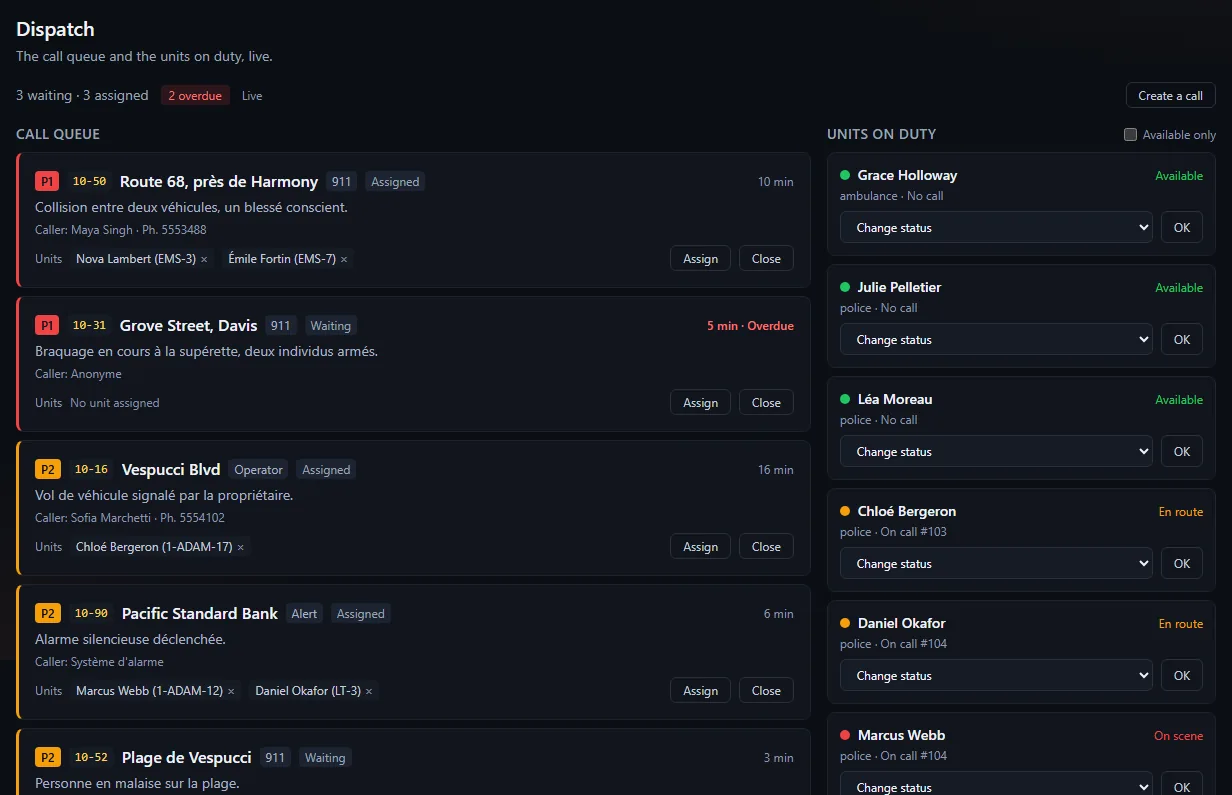
Each call shows its priority (Emergency, Normal, Low), radio code, location, caller and phone, waiting time, and assigned units.
- Create a call: radio code, location, caller, phone, priority, target department, description.
- Assign a unit, Detach it, Close the call with an optional note.
- A call waiting too long turns Overdue.
On-duty units #
Open shifts show up here. Statuses: Available, En route, On scene, Busy, Unavailable (Change status on the unit's card). A status that is too old falls back to Available. A unit engaged on a call cannot be assigned elsewhere without being detached: a unit is never on two calls at once, and no unit can be assigned to a call that is already closed.
What happens in game #
When a player types /911 robbery at the corner store:
- the call lands in the queue, with its position;
- players on duty in a job of a service that receives dispatch get the alert (on-screen notification, sound and a temporary map marker);
- the caller reads "Call sent to dispatch";
- an officer who presses Y (default key, can be changed in the FiveM key bindings) takes the last call received: the GPS is set on the call and they are assigned in the MDT. If not on duty, they read "Go on duty in a job that receives dispatch to take a call".
If the call targets a single department, only that department receives the alert. Taking a call with Y reads the call's state again at the moment of the click: two officers pressing at the same time, or a call closed in the meantime, create neither a double assignment nor a unit on a closed call.
A player cannot call more than three times per minute.
If no call arrives #
- Is the Dispatch / in-game 911 calls box ticked?
- Is the license active? Dispatch is part of the MDT.
- Is the resource up to date and seen by the site (Server → Players)?
Was this article helpful?
Related articles
- Make a 911 call in gameType /911 followed by what is happening: your call reaches dispatch with your position, and on-duty units are alerted.
- Resource settings read from the siteCommand, key, 911, cadence, animation, debug, clothing events, framework, map and language: the resource reads them at startup and applies your changes live.
- The live map: permissions, on duty, multi-job, OneSyncLive player positions for staff, and for on-duty colleagues of the same job if you open it; almost no cost for the game server.
- Configure the MDT: services, jobs and permissionsPut each in-game job in a service, then tick job by job or rank by rank what it can do; off-game access is the most important permission.