
The penal code
Sections and charges with sentence and fine; a starter code is provided, and changing a charge changes the totals of arrests that carry it.
Updated on Oct 5, 2026, 9:25 a.m.
In short. The penal code is used to compute arrest sentences and fines, in the MDT as in the citizen portal. It is read with the View the penal code permission and managed by ranks that have Manage the penal code (sections, charges).
The starter code #
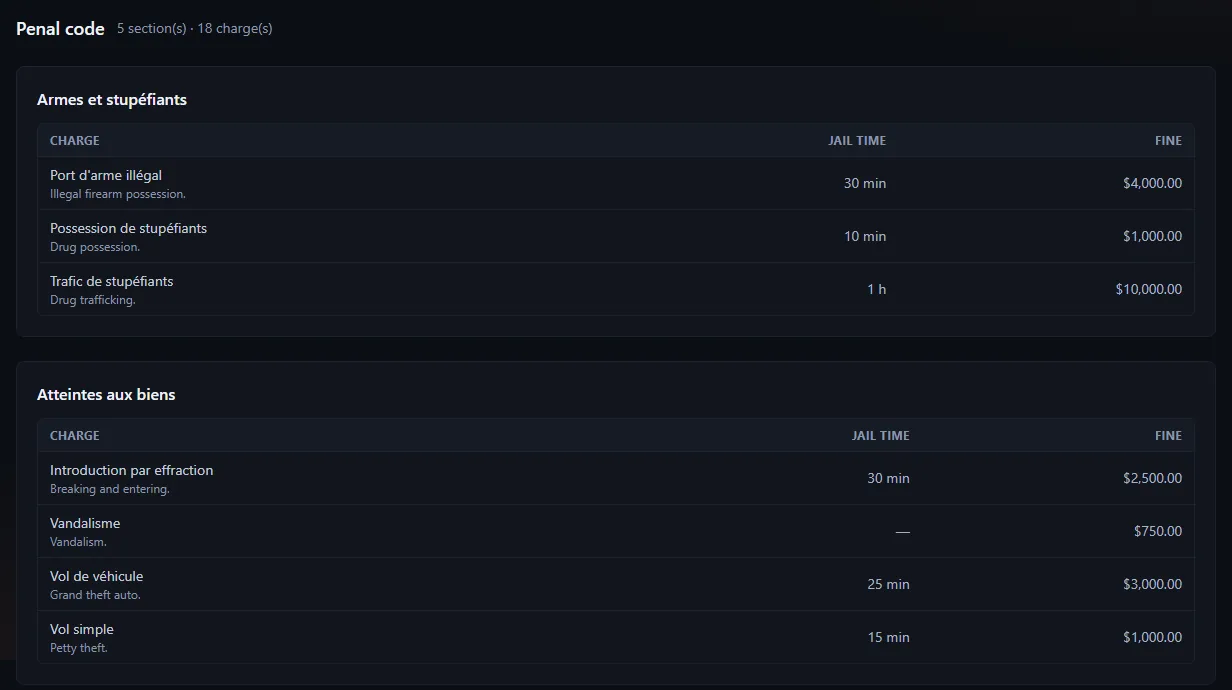
On first use, Agora creates a starter code in the site language: 5 sections and 19 charges (traffic offences, public order, property crimes, crimes against persons, drugs). It is only created if the code is empty: it is a starting point.
A charge #
| Field | Purpose |
|---|---|
| Name and description | What officers see |
| Sentence | In minutes |
| Fine | Amount in game money |
| Number of fines | How many times the fine applies |
| Cumulative | Whether the charge adds up |
Edit a charge #
- Open the department's Penal code section.
- Click Edit on the charge's row.
- Change what you need, add a note if you want, save.
Every change goes to the charge log (shown under the form) and to the administration log.
⚠ Arrest totals are computed from the linked charges. Changing a charge's sentence or fine also changes the displayed total of arrests already recorded. For a scale that only applies going forward, create a new charge and disable the old one.
An unreadable fine amount ("1 500", "abc") or a negative one is refused with a banner: it is no longer silently replaced by $0.
Disable rather than delete #
A section or a charge can be disabled: it is no longer offered, but records that cite it stay readable.
Was this article helpful?
Related articles
- Reports, warrants, BOLOs and arrestsThe everyday records: each has its page, its attachments, a complete log and a printable version.
- Configure the MDT: services, jobs and permissionsPut each in-game job in a service, then tick job by job or rank by rank what it can do; off-game access is the most important permission.
- The citizen portal: character, classifieds, the paperThe players' space: their character read-only, classifieds signed by the character, and a paper run by the server's press.