
Employees and HR: ranks, shifts, leave, time zone
Who serves, who is away, how many hours and who is slipping: hours come from in-game presence, managers handle ranks and leave with a reason.
Updated on Oct 5, 2026, 1:36 p.m.
In short. Each department's Employees & HR section (View employees permission) answers four questions: who serves, who is away, how many hours, who is slipping. Hours are not declared: they come from the in-game presence sent by the resource.
You need the game database connected, the resource deployed and at least one job attached to the department.
Who can do what #
A department's employee managers are:
- forum staff (
admin,moderateur); - a role with the Manage an MDT department right for this department;
- in-game ranks with the Manage the service's employees permission, for that job's department only.
| Action | Who |
|---|---|
| See the HR page, their own hours, request leave | Every member of the department |
| Open another officer's HR page | Managers |
| Add or remove a member, change a rank (with reason) | Managers |
| Accept or refuse leave | Managers |
| Add a forgotten shift, correct hours (with reason) | Managers |
| Close abandoned shifts of every department | Staff only |
Outside staff, a manager never touches anything about themselves, and promotes no one above their own rank.
The roster #
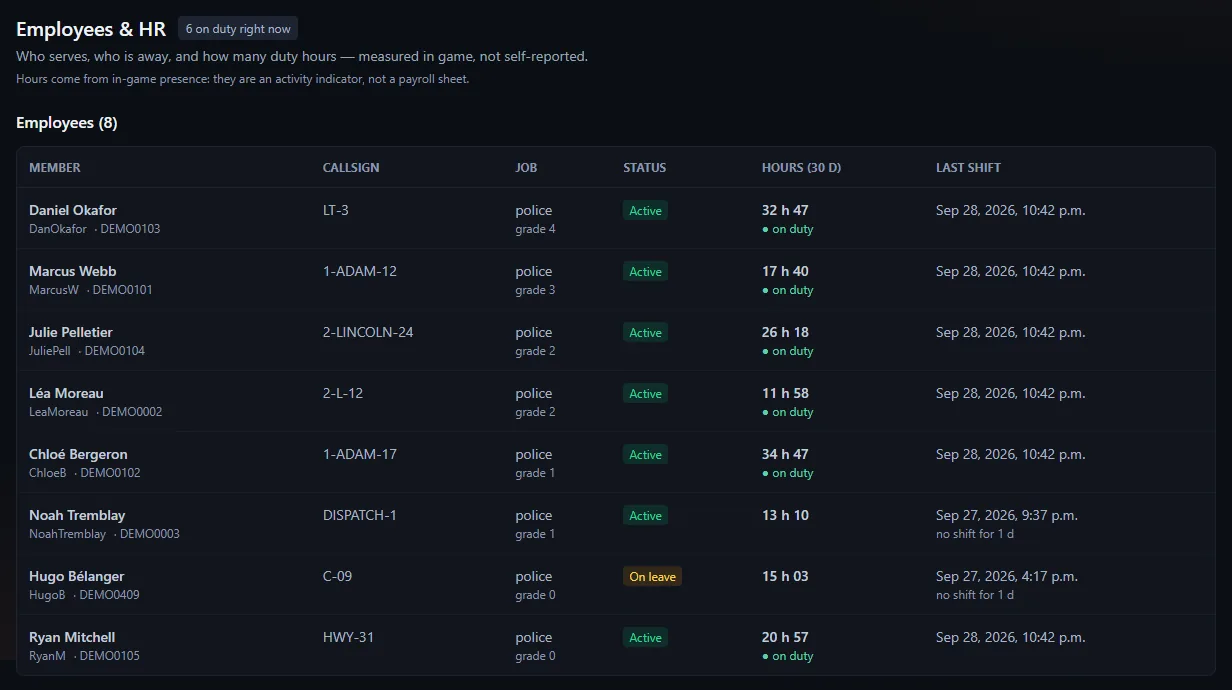
A member carries: name, character ID (this is what links the hours), forum account (optional), job, rank, callsign, status, internal note. The employee list is filled by hand (Add a member to the roster, Remove from the roster).
Changing a rank requires a reason (3 to 500 characters). The officer's HR page keeps their rank history and seniority.
A few safeguards when several managers work at the same time:
- A record changed in the meantime is not overwritten. If you save a record that stayed open while another manager changed it (a promotion, for example), saving is refused: "This record was just modified by someone else: reload the page, then redo your change. Nothing was saved." Without this, the old rank would have come back without anyone deciding it.
- No duplicates. Adding the same person twice to the same position is refused: "This person is already on the roster for this position: edit their record instead of adding a second one." A double click on Add no longer creates two seats (which counted the hours twice). An account that serves with two characters in the same position keeps one record per character.
- Removing twice is clear. Removing an employee who is already removed shows "Employee not found" without writing anything more to the HR log.
- Removing an employee or a leave request asks for confirmation on the page (sentence, button, Cancel), like the other actions that cannot be undone.
Next to the entered status, Agora shows the actual status: "On leave" during accepted leave, "Inactive" after 21 days without a shift.
Shifts #
A shift opens when a player connects with a character of one of the department's jobs, and closes when they disconnect. A shift never closed (server killed abruptly) is capped at 12 h and counts no confirmed minute.
Managers can Close a shift, add a forgotten shift or correct hours: 12 h at most, nothing in the future, nothing older than 90 days, no overlap. The correction stays visible ("corrected by …").
Leave #
- Request leave: start, end, reason (at least 3 characters), department or "all my departments".
- A manager accepts or refuses, with an optional note.
Maximum length: 180 days. The end day is included. The reason is only visible to managers and the person concerned; others only see who is away and when. The reason is never sent by the leave.requested webhook (it may be health-related).
- Leave targets a post. When it targets a specific job, the officer is "On leave" on that post only: they stay active, and counted in activity tracking, on their other posts (the roster, the HR page and activity tracking follow the same rule). "All my departments" leave covers all of them.
- Leave that has already ended can no longer be accepted: the manager reads "This leave has already ended."
The HR time zone #
Shifts and leave are entered and displayed in the HR time zone, whatever the zone of the machine hosting Agora. Set it in Administration → Configuration → Site identity, Community time zone block: type a country or a city (Toronto, Paris…) and pick a suggestion, or enter an IANA name such as Europe/Paris; empty = America/Toronto. It applies to the whole Hub: forum, MDT, HR, donations, and court hearing dates.
Activity tracking #
Over 7 days, 30 days or the current month: hours served, hours expected, number of shifts, last shift, and a verdict ("up to date", "no shift", "below threshold"…). Accepted leave excuses. Managers set the department threshold (180 minutes per week and 14 days by default) and export as CSV.
Hours come from in-game presence: it is an activity indicator, not a payroll sheet.
Was this article helpful?
Related articles
- Configure the MDT: services, jobs and permissionsPut each in-game job in a service, then tick job by job or rank by rank what it can do; off-game access is the most important permission.
- Create an MDT service for a jobA service of its own (mechanic, taxi…) gives a job its own reports, fleet and roster, invisible to other jobs.
- Groups and permissionsForum groups carry rights (moderate, review applications, manage an MDT department); MDT rights come from the in-game job.
- Outgoing webhooksNotify a Discord channel (or an integration) on every application, warrant, BOLO, leave request, thread, update or purchase.