
Groups and permissions
Forum groups carry rights (moderate, review applications, manage an MDT department); MDT rights come from the in-game job.
Updated on Oct 3, 2026, 6:39 p.m.
On this page
In short. Agora has two independent rights systems. Forum groups decide the forum, applications and administration. The in-game character's job and rank decide the MDT. A police captain may have no rights on the forum, and the other way round.
Starting groups #
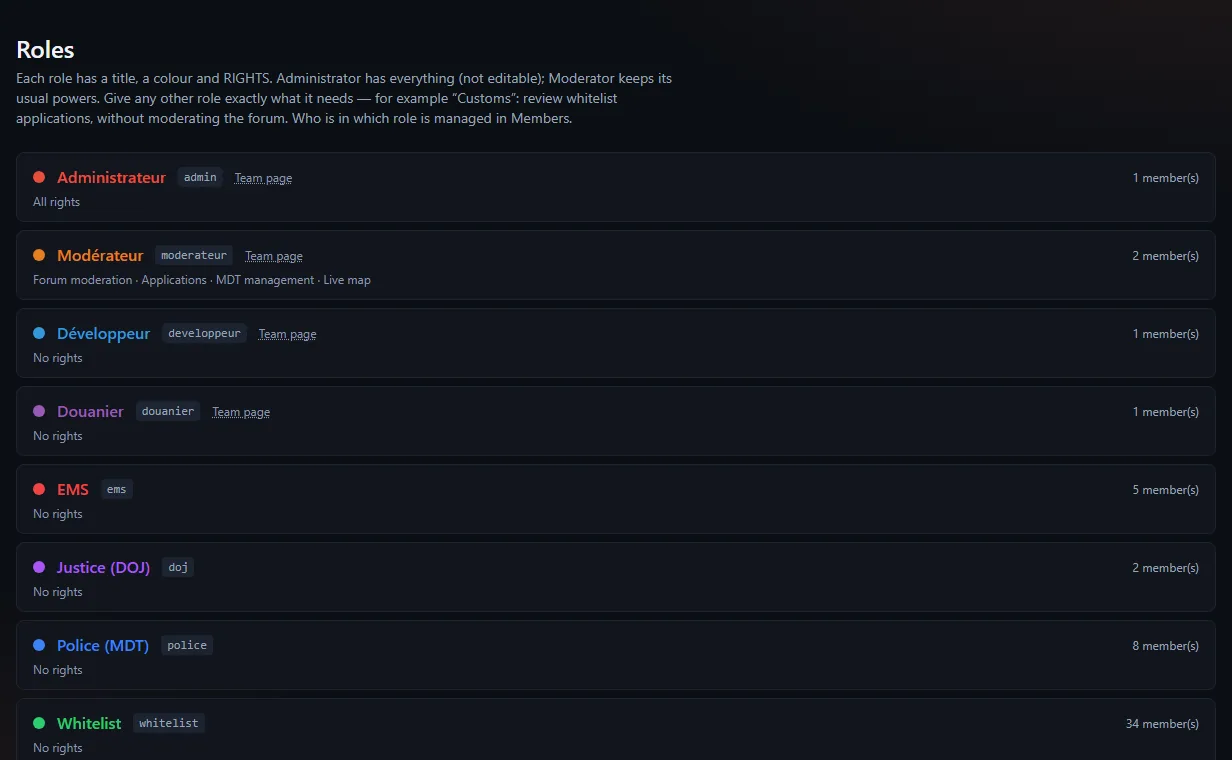
| Group | Role |
|---|---|
Administrator (admin) | Every right, cannot be changed |
Moderator (moderateur) | Forum moderation, applications, MDT department management, everywhere |
| Developer, Customs officer | Sample staff groups, no specific right |
| Police, Justice, EMS | Useful for the fallback without a game database |
| Whitelist | Granted by the whitelist application |
Undocumented (membre) | Given to every new member |
The group with the highest priority decides the username colour.
Create a group and give it rights #
Administration → Roles → New group: a title and a colour. The technical key comes from the title and never changes.
Open the group and tick its Rights, Everywhere or Or only for some sections, forms or departments:
Right What it opens Moderate the forum Pin, close, move, archive; hide someone else's post Review applications See files, accept, reject, reopen, annotate, move the stage forward Manage an MDT department Roster, leave and shifts of the department Tick Show this role on the Team page if you want it listed on
/staff(and in the home page Team block). This box grants no right. Disabled, banned or anonymized accounts never appear there.Save.
Example: a "Customs officer" group with Review applications for the whitelist form only. Its members see Moderation → Applications, only whitelist files, and do not moderate the forum.
Rules to know #
- A member can have several groups: their rights add up.
- Configuration (forum structure, forms, settings) stays with administrators.
- Rights are used on the site, never from the in-game tablet. One exception: an administrator who switches the tablet to administrator view sees the whole MDT and the whole forum there. A moderator only ever has their player rights, and administration, the console, moderation, applications, groups, the license and updates stay closed from the game.
- In that administrator view of the tablet, the destructive MDT actions (deleting a record, a file, a photo, an attachment, a penal code article, a vehicle, a court case; managing a department's roster) are done from the site. In player view, the tablet follows the character's rank, as for any officer. See The in-game tablet.
- A member of a group with rights counts as staff for 2FA.
- A form that grants a group with rights can only be accepted by an administrator.
- A group can only be deleted when empty, and when no section, home block or form refers to it.
admin,moderateurand the default group can never be deleted. - The titles of
adminandmoderateurcan be renamed; their keys, never.
Who is in which group #
This is set in Administration → Members. See Manage members.
MDT rights #
They are set per job and rank in MDT → Settings. See Configure the MDT.
Was this article helpful?
Related articles
- Manage members: groups, suspension, anonymisationAdministration → Members: give or remove a group, resync Discord roles, suspend, sign out everywhere, anonymise an account.
- Configure the MDT: services, jobs and permissionsPut each in-game job in a service, then tick job by job or rank by rank what it can do; off-game access is the most important permission.
- Organise the forum: categories and sectionsThe structure is edited right on the forum, in edit mode: a draft, then Apply sends everything at once.
- Require two-factor authentication for staffOne box in Administration → Configuration → Security: a staff member without 2FA on Discord can no longer enter the admin area or the MDT; the forum stays open.