
The department vehicle fleet
The department's vehicles: register them, check them out and back in, send them to the garage; and the checkbox that unlocks EMS.
Updated on Oct 5, 2026, 1:36 p.m.
In short. Fleet manages the department's vehicles (patrol cars, ambulances, vans): who took which car, since when, and in what state it came back. Not to be confused with Plates, which searches players' vehicles.
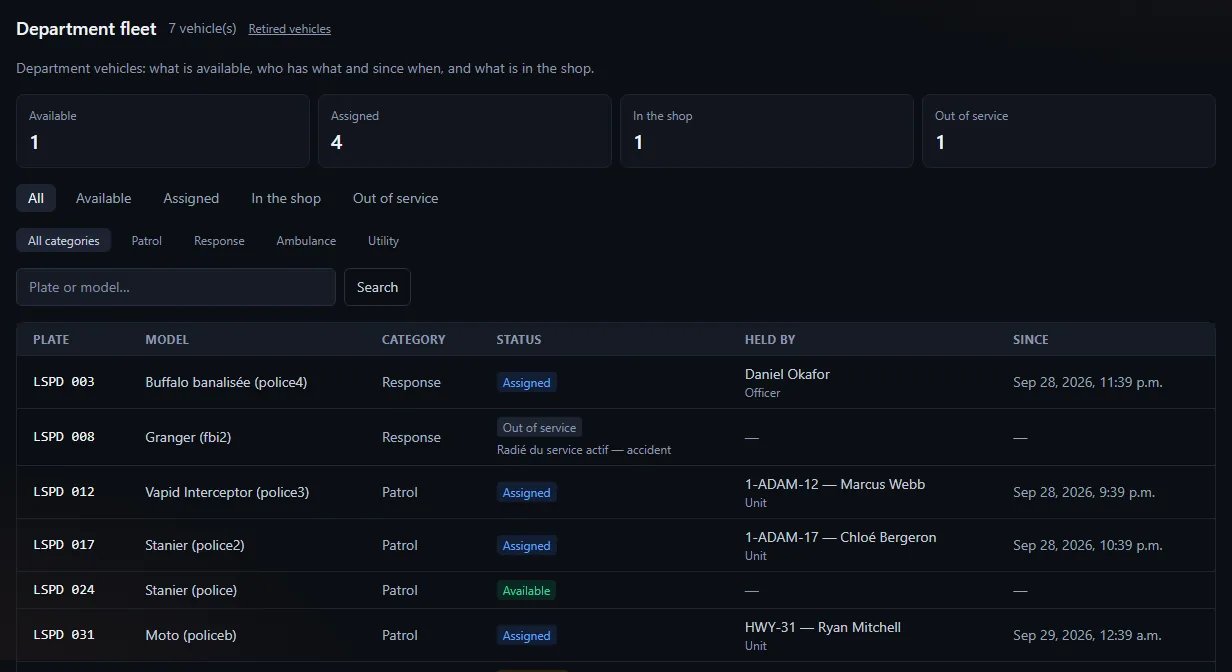
The table shows 60 vehicles at most at a time. If the fleet is bigger, a line says so ("60 vehicle(s) shown out of 80: refine the search"): search for a plate or a model, or filter by category or status, to find the others.
Who has a fleet #
Any service where a job or a rank has the View the service fleet permission (ticked in MDT → Settings). One department's fleet cannot be found from another.
Permissions #
| Action | Permission |
|---|---|
| See the fleet and logs | View the service fleet |
| Check a vehicle out and back in | Write a report |
| Register, correct, garage, return to service, retire | Issue / edit a warrant or Delete a citizen file |
The EMS case. EMS does not issue warrants, and Delete a citizen file is not ticked anywhere until you do it. Result: the section shows, but with no button to register a vehicle. Tick Delete a citizen file at the command rank (never at the lowest rank: it also allows erasing a citizen record).
Register a vehicle #
Command staff, Register a vehicle button:
- Registration plate (2 to 12 characters, formatted automatically). It is unique across the whole server and cannot be changed later;
- Model (e.g. "Ford Explorer — unmarked");
- Category: Patrol, Intervention, Ambulance, Utility;
- Optional notes.
The vehicle starts Available.
Check out and back in #
- On an Available vehicle, Vehicle checkout: holder type (Unit or Officer), holder (e.g.
Adam-12), note. - On return, Return the vehicle: Nothing to report, Empty tank, Damage or Incident.
Damage and Incident send the vehicle In repair. A word is required as soon as the state is not "Nothing to report". Two officers clicking at the same time: only one leaves with the car.
The garage #
Command staff, Maintenance and availability: Send to the garage (reason required), Return to service, Take out of service. A checked-out vehicle must be returned first. Retire the vehicle removes the vehicle and its history: the site first asks for confirmation on the page (sentence, button, Cancel).
A vehicle "assigned" whose checkout could not be written (game database cut at the wrong moment) stays stuck: Return is refused and so is the garage. It is rare; command staff has no button yet to fix it, ask a game database administrator.
The two logs #
- Checkout log: who took the car, when, who returned it, what was reported.
- Vehicle log: registration, corrections, state changes with their reason.
Was this article helpful?
Related articles
- Configure the MDT: services, jobs and permissionsPut each in-game job in a service, then tick job by job or rank by rank what it can do; off-game access is the most important permission.
- Create an MDT service for a jobA service of its own (mechanic, taxi…) gives a job its own reports, fleet and roster, invisible to other jobs.
- Citizen records, plates and licensesCharacters are read live from the game database; the MDT adds notes, photos, warrants, arrests and medical records.