
Handle reports
Moderation → Reports: dismiss, hide, warn, archive or suspend, always with a reason; and block a member who reports over and over.
Updated on Oct 5, 2026, 1:36 p.m.
On this page
In short. Members report a post or a thread. The report lands in Moderation → Reports, with the number to handle shown on the tab. You make a decision, reason required.
The three views #
- To handle: oldest first.
- Handled: newest first, with the outcome, who decided, when and the reason.
- Archived: 25 per page.
A report is never deleted: once handled, it is archived (reason required) and can be unarchived.
If you open a page that no longer exists (an old bookmark, a "page 9" link when the list has shrunk), Agora takes you back to the start of the list instead of showing "no result". The same goes for the archives, a forum section's list, a thread's messages and the notifications.
Handle a report #
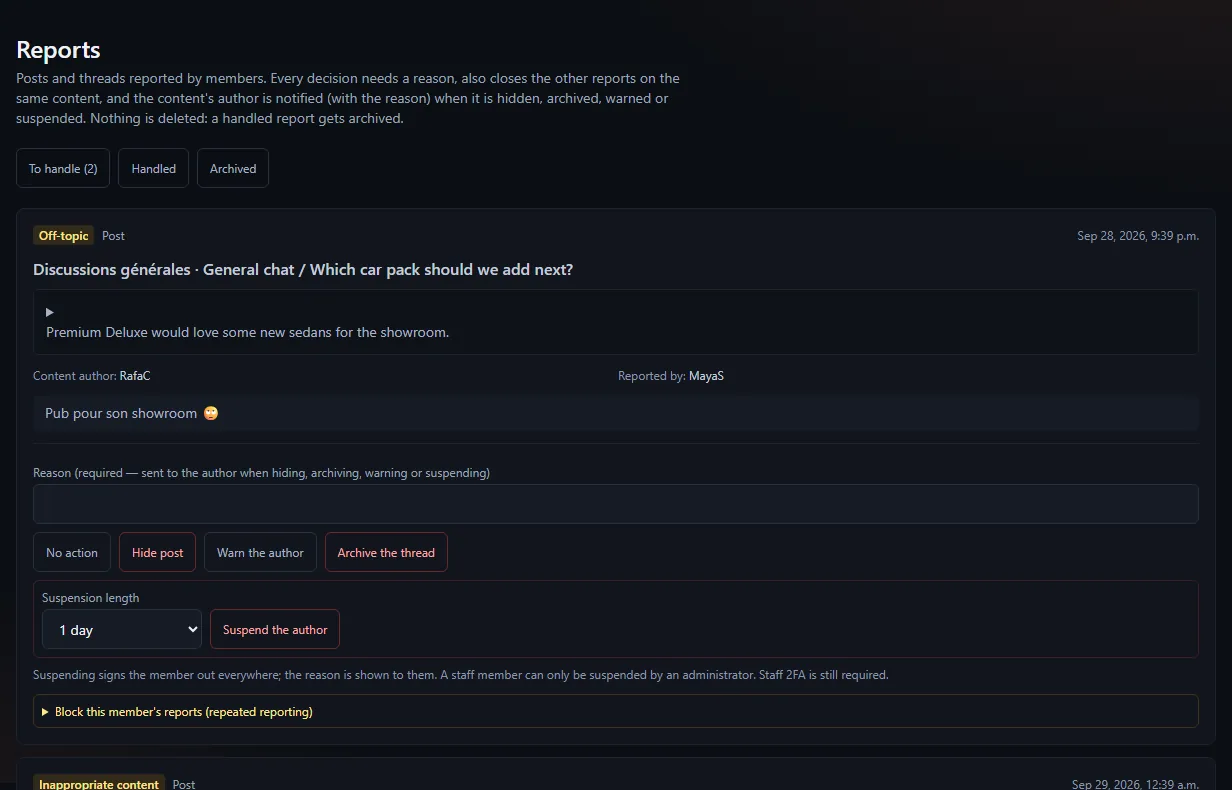
Read the reported content (post excerpt or thread), its author, who reported it, the reason and the details.
Pick a decision:
Decision Effect No action Nothing changes, the report is closed Hide the post The post is hidden (reversible) and the author notified Warn the author The author gets a warning with the reason Archive the thread The thread goes to the archives (restorable) Suspend the author Duration (1 d, 7 d, 30 d or permanent) and reason Write the reason, then confirm.
Every decision also closes the other open reports on the same content. If the author removes their own message, its open reports are closed too.
Being told about a new report #
A report does not announce itself: to have it land in a Discord channel, add a webhook on the report.created event (Moderation group). It gives the section, the thread title and the reason, with a link to this screen, and never who reported, their comment or who is targeted. For a restricted section, the section and title are left out.
The reporter is told #
When you handle a report, the person who made it receives a notification, "Your report was handled by the staff", once, without the outcome or the reason of your decision. Nothing is sent if their account was deleted.
Who can suspend from a report #
Moderators can (with staff 2FA if required). A staff member, however, can only be suspended by an administrator. If the author is already suspended, the report is simply closed.
A member who reports over and over #
Under each report, you can block their reports:
- Pick a duration: 1 h, 24 h, 7 d, 30 d or permanent.
- Give a reason.
The member is notified. If they try to report, they see until when and why. The block lifts on its own when it expires, or by hand (reason required).
Suspending and blocking apply site-wide: they are reserved for staff (admin, moderateur), not for groups that moderate a single section.
What is logged #
Every decision, archiving, block and unblock is written to the administration log.
Was this article helpful?
Related articles
- Moderate the forum: hide, archive, mandatory reasonNothing is ever deleted: a post is hidden, a thread is archived, and every action requires a reason sent to the author.
- Manage members: groups, suspension, anonymisationAdministration → Members: give or remove a group, resync Discord roles, suspend, sign out everywhere, anonymise an account.
- Report a post or a threadUnder a post, Report; under a title, Report thread: pick a reason, staff receive your report discreetly.