
Site settings and the home page
Administration → Configuration applies everything live: name, logo, language, public address, theme, Discord, payments, security, map, portal, dealership and tablet.
Updated on Oct 3, 2026, 6:39 p.m.
In short. Administration → Configuration applies live, with no restart or redeployment. Each category has its role.
The categories #
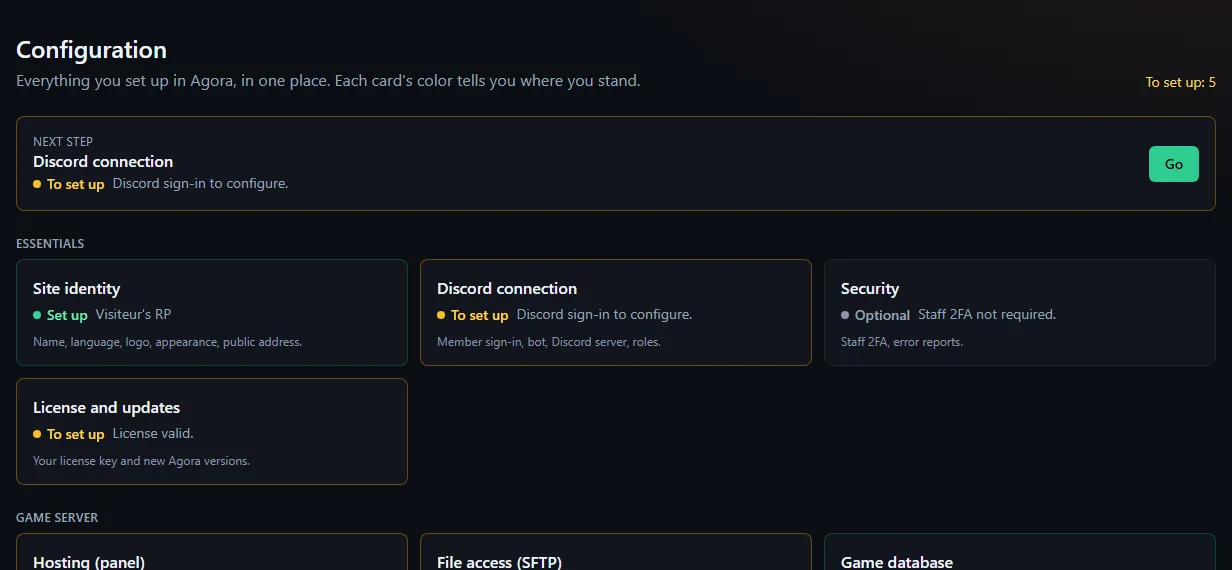
| Category | What you set there | See also |
|---|---|---|
| Site identity | Site name (60 characters), logo, main language, public address, and Appearance (theme: presets or accent colour, light or dark mode) | Below |
| Discord connection | OAuth sign-in (ID and secret: owner only), bot, group roles, Suspended member | Discord roles |
| Payments | PayPal for donations and real-money dealership sales, Webhook ID for refunds made at PayPal | Donation campaigns |
| Security | Staff 2FA, error reports | Staff 2FA |
| Live map | Map background, cadence, who shows up | Live map |
| Citizen portal | Open the portal, money, warrants, press job (what the player sees of their character, the classifieds and the journal) | Citizen portal |
| Dealership | Photos, delivery garage, plates, tax | Dealership |
| Agora resource | Command, key, secret, 911, resource to download | Settings read from the site |
| txAdmin | txAdmin address and what the resource relays | txAdmin in Agora |
License, hosting (panel), SFTP access and the game database also have their category here; the MDT is set up in MDT → Settings.
Site identity #
- Logo: any image up to 10 MB (PNG, JPEG, WebP, SVG, GIF, AVIF), resized automatically. It is also the icon when the site is installed as an app.
- Main site language:
froren, for visitors who chose nothing. Each member picks their own in My account. - Public forum address: the address players use to open the site. It is copied into the FiveM resource. After a change, redeploy the resource. The Use this page's address button fills it for you. If the
AUTH_URL(orSITE_URL) variable is set, that one is used.
Appearance #
Pick a ready-made theme or your own accent colour. Contrast is checked: a colour that would make links unreadable is refused. The theme also applies to the in-game tablet. There is deliberately no free CSS.
The home page #
The home page (Home) is built right on the page, from blocks, each visible to everyone or reserved to some groups: click Edit, then Publish. There is no separate tab in the administration any more. All the detail is in Compose the home page.
Preview as shows the result for a visitor, a member or a whitelisted player before publishing.
Install the site as an app #
Over HTTPS, the site installs on a phone or computer and opens full screen. None of the content is kept offline: MDT records do not stay on a lost phone.
Was this article helpful?
Related articles
- Donation campaigns (PayPal)Connect PayPal, create a campaign with a goal and milestones, approve the sample campaign, follow and export donations received.
- Resource settings read from the siteCommand, key, 911, cadence, animation, debug, clothing events, framework, map and language: the resource reads them at startup and applies your changes live.
- The live map: permissions, on duty, multi-job, OneSyncLive player positions for staff, and for on-duty colleagues of the same job if you open it; almost no cost for the game server.
- The citizen portal: character, classifieds, the paperThe players' space: their character read-only, classifieds signed by the character, and a paper run by the server's press.
- Require two-factor authentication for staffOne box in Administration → Configuration → Security: a staff member without 2FA on Discord can no longer enter the admin area or the MDT; the forum stays open.