
The court and the criminal record
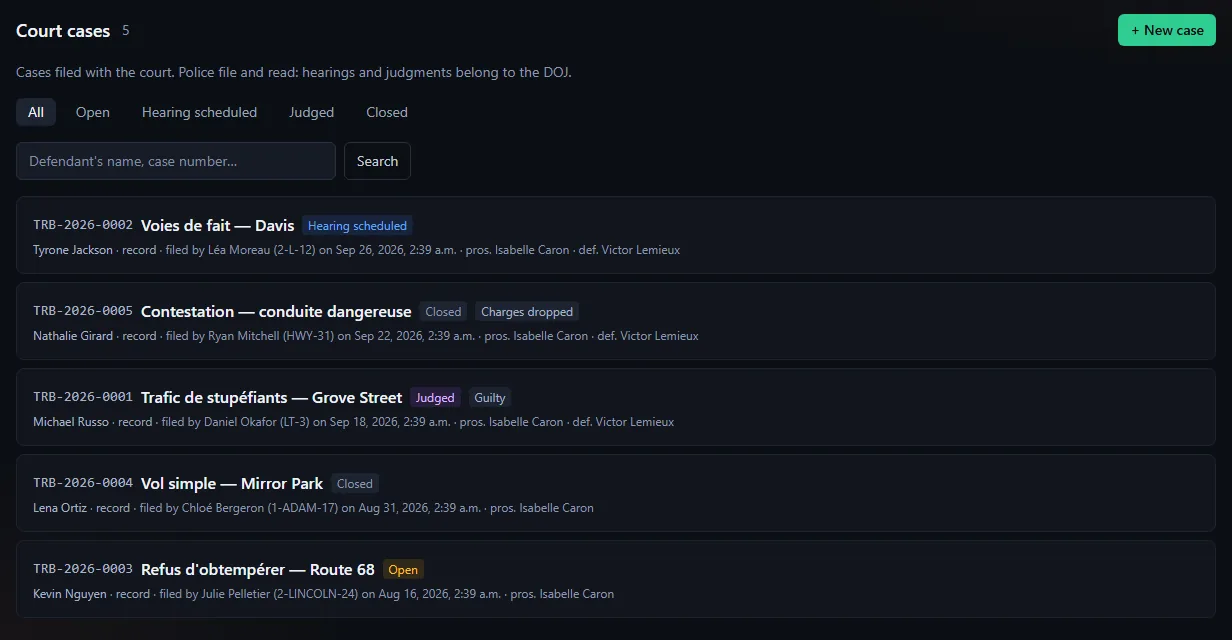
File a case, schedule hearings, hand down a judgment that enters the criminal record and flows back to the original arrest; no sentence is applied in game.
Updated on Oct 5, 2026, 9:25 a.m.
On this page
In short. The court (Police and DOJ) follows a case after the arrest: a case file, hearings, a judgment and the criminal record. It applies no sentence in game: nobody is sent to a cell, no fine is taken. The MDT writes what was judged; staff apply it.
Who does what #
| Department | What it can do |
|---|---|
| DOJ (a service where a rank has Court: hear, rule and close cases) | Everything: file, correct, schedule hearings, judge, remove from the record, close, delete |
| Police (a service that only has Court: file and view cases) | File a case and read |
| A service without these permissions (EMS, Other…) | Nothing: the section does not exist for it |
| Action | Permission |
|---|---|
| Read | Court: file and view cases |
| File | Issue / edit a warrant or Record an arrest |
| Prosecute, judge, close, delete | Be in a service that has Court: hear, rule and close cases (the DOJ) and have Issue / edit a warrant |
File a case #
- Court → + New case.
- Search the defendant in the game database (at least 2 characters).
- Fill in the subject (3 to 200 characters), the statement of facts, the prosecutor and the defence lawyer (optional).
- Save: the case gets a number
TRB-2026-0001(the series restarts each year).
Current limit. There is no "file with the court" button on an arrest or a warrant yet. A case filed from + New case is therefore not linked to the original arrest, and the judgment does not flow back to it.
Find a case #
Search (defendant name or case number, at least 2 characters) is rate-limited per account, like every MDT search: too many searches in a row, or an already busy server, show a message instead of a result. The list stops at 60 cases and says so: search a name or number, or filter by state, to find an older case.
Hearings and judgment (DOJ) #
- Schedule a hearing: type (Appearance, Trial, Sentencing, Appeal), date and time required, who presides, notes. The date and time are entered and shown in the community time zone (Administration → Configuration → Site identity, e.g. Toronto), whatever your browser's. Afterwards, Record the decision: beyond 4,000 characters it is refused (a banner says so) instead of being cut.
- The judgment: only one per case (correcting it replaces it). Verdict (Guilty, Not guilty, Charges dropped), prison in minutes, fine, community service in hours, reasons. Any verdict other than "Guilty" resets the sentence to zero.
Handing down a judgment moves the case to Judged, writes the conviction to the criminal record, and, if the case comes from an arrest, marks that arrest "guilty" or unmarks it.
The criminal record #
From a citizen's record, View criminal record. It shows only court convictions, with cumulative prison, fines and community service.
The DOJ can Remove from the record a conviction (other departments no longer read or count it) and Put back on the record.
Case states #
Open, Hearing scheduled, Judged, Closed. A closed case does not move on its own: it must be reopened explicitly.
Everything is logged #
Each case has its log: filing, correction, hearing, judgment, removal from or return to the record. Deleting a case (DOJ) is permanent.
Was this article helpful?
Related articles
- Reports, warrants, BOLOs and arrestsThe everyday records: each has its page, its attachments, a complete log and a printable version.
- Citizen records, plates and licensesCharacters are read live from the game database; the MDT adds notes, photos, warrants, arrests and medical records.
- Configure the MDT: services, jobs and permissionsPut each in-game job in a service, then tick job by job or rank by rank what it can do; off-game access is the most important permission.
- The citizen portal: character, classifieds, the paperThe players' space: their character read-only, classifieds signed by the character, and a paper run by the server's press.